Mastering AI Prompts: The Complete Beginner’s Guide to Getting Better Results from AI
Why Is Your AI Giving You Such Boring Answers?
A few months ago, a friend of mine who runs a small local bakery decided to use an AI tool to help with her social media post. She was excited to see what AI could do.
She typed:
“Write a post for my bakery.”
The AI generated a generic paragraph about fresh ingredients, quality baking, and a passion for serving customers. It wasn’t technically wrong but it sounded ordinary, predictable, and completely lacked personality.
My friend was disappointed. She thought, “Maybe AI just isn’t that smart.” But the AI wasn’t the problem. The prompt was.
Imagine if she had written something like this:
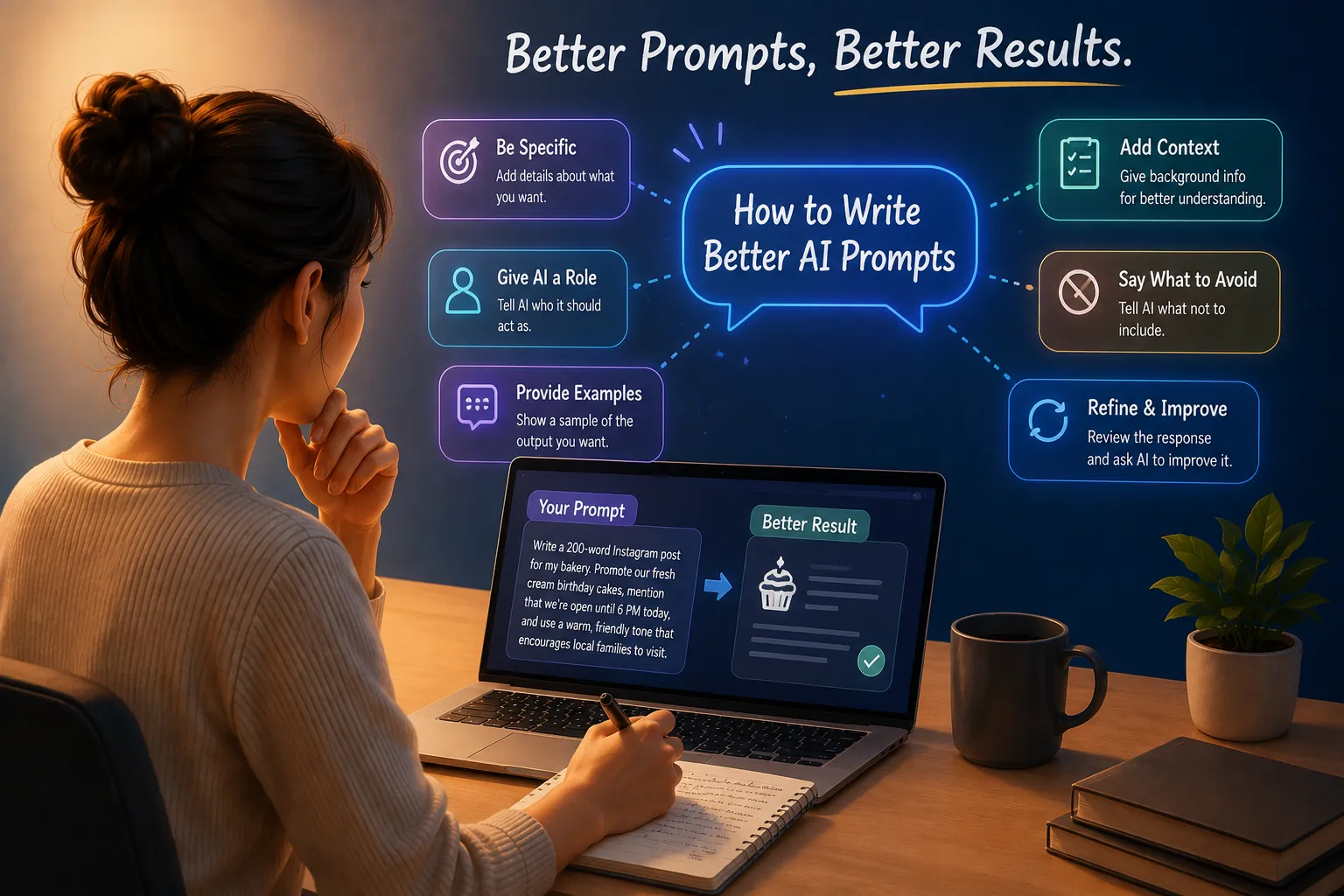
“Write a 200-word Instagram post for my bakery. Promote our fresh cream birthday cakes, mention that we’re open until 6 PM today, and use a warm, friendly tone that encourages local families to visit.”
She would have gotten a completely different and much better result. Most people using AI today aren’t getting poor answers because the technology isn’t good enough. They’re getting poor answers because nobody ever taught them how to communicate effectively with it.
AI is surprisingly good at following instructions, but it can’t read your mind. The clearer your request, the better the response is likely to be. That’s why prompting has quickly become one of the most valuable digital skills today. Knowing how to guide AI can save hours of work and produce far better results.
What Exactly Is an AI Prompt?
An AI prompt is the information or instruction you give an AI system to tell it what you want.
Every time you chat with an AI assistant like ChatGPT, Gemini, Claude, or another AI tool you’re writing prompts, even if you don’t think of them that way.
Many of us assume a prompt is simply a question. Sometimes it is. But prompts can do much more than just ask questions.
You can instruct AI to:
- Create content
- Summarize information
- Analyze data
- Compare details
- Brainstorm ideas
- Translate text
- Rewrite content
- Act as a specific type of expert
A prompt can be as short as a single sentence or as detailed as several paragraphs. The amount of detail you provide usually determines how useful the response will be.
Why Prompting Has Become Such an Important Skill
Millions of people now use AI every day to write emails, summarize long reports, prepare presentations, generate images, learn new skills, brainstorm business ideas, and even plan family vacations.
Yet many users still type only a few vague words and expect perfect results. When the response isn’t helpful, they assume AI has failed just like my friend with the bakery. In reality, the AI simply wasn’t given enough information.
Let’s compare two prompts:
Basic Prompt
“Suggest a place to visit.”
Better Prompt
“I’m planning a five day family trip during December. My budget is around $1,000 and we’d love somewhere with pleasant weather and activities for children.”
Both are valid prompts. But only one gives the AI enough context to provide a genuinely useful recommendation.
The basic prompt leaves the AI guessing about the budget, available time, the season, travel companions and interests. The second prompt leaves very little room for guesswork.
This simple difference can have a huge impact on the quality of the response.
A better prompt often means:
- More accurate answers
- Less time spent editing
- Higher quality content
- Fewer misunderstandings
- More useful and relevant responses
- Greater productivity
Prompting isn’t about learning a secret formula. It’s about learning how to communicate clearly, and that’s a skill that benefits you far beyond AI.
What Makes a Great AI Prompt?
A Simple Framework Anyone Can Use
You don’t need to be a computer scientist to get excellent results from AI. You just need a framework.
Think about ordering food at a restaurant. If you say,
“I’ll have a sandwich.”
- the waiter will almost certainly ask follow up questions.
- What kind of bread?
- Which filling?
- Would you like it toasted?
- Any sides?
Now imagine saying,
“I’d like a grilled chicken sandwich on whole wheat bread, toasted, with lettuce and tomatoes, but no mayonnaise.”
The waiter knows exactly what you want.
AI works in much the same way. A well-written prompt reduces guesswork and helps the AI produce a better answer on the very first attempt.
Here’s a simple framework you can use almost every time you interact with AI:
| Element | What It Means | Example |
|---|---|---|
| Goal | What do you want AI to do? | Write an Instagram post |
| Context | Background information | The audience is beginners |
| Role | Who should AI act as? | An experienced science teacher |
| Task | The specific work to perform | Explain Generative AI |
| Audience | Who is the content for? | High school students |
| Tone | How should it sound? | Friendly and conversational |
| Format | How should it be presented? | Markdown with H2 and H3 headings |
| Constraints | Any limits or rules | Around 1,000 words, simple English |
- Don’t worry about including every element every time.
- For quick questions, a short prompt is often enough.
- For more detailed tasks such as writing social media posts, emails, presentations, reports, or code, the more relevant context you provide, the better the results tend to be.
Prompting Techniques That Separate Casual Users from Power Users
Once you’re comfortable with the basics, a few simple prompting habits can dramatically improve the quality of your AI conversations. Let’s look at some of the most effective techniques.
1. Be Specific, Not Vague
Vague prompts get vague answers.
“Give me marketing ideas.”
This will almost always underperform a more specific prompt like:
“Give me five low-budget marketing ideas for a small bakery in a residential neighborhood, targeting families with kids.”
The more context you provide, the more relevant and useful the AI’s response is likely to be.
2. Show AI an Example
If you have a general idea of the kind of output you want, give the AI an example.
Something like, “Write it in a style similar to this: [paste a short sample].”
This technique is commonly known as few-shot prompting, but you don’t need to remember the term. Just remember the idea. Examples often communicate expectations better than descriptions.
3. Give AI a Role
Asking the AI to “Act as an experienced dietitian or Act as a strict but supportive English teacher” can significantly influence the tone, depth, and style of its response. Giving AI a role provides a clearer perspective from which to answer your request.
4. Break Large Tasks into Smaller Steps
Instead of asking AI to “Write my entire business plan.” Ask it to help you with one section at a time. For example,
“The executive summary, then the market analysis, and then the financials.”
Breaking large tasks into smaller parts usually results in more focused and higher-quality responses.
5. Tell AI What to Avoid
Don’t just tell AI what to include, tell it what to avoid as well.
“Don’t use technical jargon” or “Don’t make it sound like a sales pitch.”
Negative instructions often influence the quality of the response just as much as positive ones.
6. Refine the Conversation Instead of Starting Over
One of the biggest mindset shifts when using AI is understanding that your first prompt doesn’t have to be perfect.
Ask your question, review the response, and then refine it.
Like:
- make it shorter
- make it sound more casual
- remove the third point
Professionals who use AI every day rarely get everything right in one attempt. Instead, they improve the response through follow up prompts.
7. Ask AI to Review Its Own Work
A simple follow up such as:
“Can you check this for anything unclear or repetitive?”
can often identify issues you may have missed.
AI is surprisingly good at reviewing and improving its own output.
8. Request Multiple Options
Instead of asking for a single answer, ask for several options.
For example:
“Give me three different ideas for Instagram Reels.”
Having multiple versions makes it easier to choose the one that best matches your style or purpose.
9. Build Your Prompt Gradually
There’s no rule that says your prompt has to be perfect from the beginning. Start with the main idea and refine it through follow up questions. Many experienced AI users work this way because it allows the AI to adapt as the conversation evolves.
When AI Doesn’t Get It Right
Sometimes AI gets things wrong. Occasionally, it may produce what’s commonly called a hallucination—a response in which the AI confidently presents information that isn’t actually correct.
This usually happens when the AI doesn’t have enough information, when the prompt isn’t clear enough, or when it’s asked about something beyond its available knowledge. If something doesn’t seem right, ask follow-up questions such as:
- How did you arrive at this conclusion?
- Can you verify these facts?
- Please provide reliable sources.
Think of AI as a helpful assistant, not an unquestionable expert. You’re not just typing a command; you’re having a conversation.
Before and After: See How a Better Prompt Changes the Result
One of the easiest ways to understand effective prompting is by comparing a basic prompt with an improved version.
| Basic Prompt | Improved Prompt |
|---|---|
| Write a Instagram Post about AI. | Write a 500-word beginner-friendly Instagram Post about Artificial Intelligence. Use simple English, H2 and H3 headings. |
| Explain photosynthesis. | Explain photosynthesis like I’m a 12-year-old, using an everyday example, in under 150 words. |
| Create a meal plan. | Create a healthy seven-day vegetarian meal plan for a family of four with a moderate budget. |
| Help me study history. | Create a one-week study plan for learning World War II, including daily topics, quizzes, and revision sessions. |
| Write an email. | Write a polite email requesting a meeting with a client next Tuesday. Keep it professional and under 150 words. |
| Plan a trip to Goa. | Plan a 3 day budget trip to Goa for a couple, focused on beaches and local food, while avoiding touristy restaurants. |
| summarize this. | summarize this report for a busy manager who only has 30 seconds to read it. |
Notice that the better prompts don’t use complicated language or fancy words. They simply provide enough information for the AI to understand the task more clearly and to produce a response that’s useful the first time around.
Can AI Help You Write Better Prompts?
Interestingly, yes. One of the easiest ways to improve your prompting skills is to ask AI to improve your prompt before answering it.
For example, you could write:
“Improve the following prompt so it’s clearer, more specific, and more likely to produce a high quality response.”
Then paste your original prompt below it. AI will often suggest improvements such as:
- Adding useful background information
- Clarifying your goal
- Defining the target audience
- Choosing a better output format
- Removing ambiguous wording
- Including helpful constraints
It’s a simple habit, but it can dramatically improve your results over time.
General Purpose Template
Try it.
- Act as a [role].
- Help me with [task].
- Here is the background information: [Context]
- The target audience is: [Audience]
- Use a [tone] tone.
- Present the output as: [Format]
- Additional requirements: [Any constraints such as word count, examples, writing style, things to avoid, etc.]
A Final Thought on the Future of Our Conversations
Mastering AI prompts is about communicating your ideas more clearly, thinking through what you really need, and giving AI enough direction to help you effectively.
Don’t worry about being perfect. Just experiment. Like any skill, prompting gets better with practice.
Every conversation teaches you something new. Some prompts will work brilliantly, while others may need a few adjustments and that’s perfectly normal. The next time an AI tool gives you an answer that isn’t what you expected, don’t assume the technology has failed. Pause for a moment and look at your prompt.
Ask yourself:
Could I explain this more clearly?
Quite often, a small change in how you ask the question is all it takes to unlock a much better answer.
And that’s the real secret to mastering AI prompts.